
How Microsoft Copilot finds and cites sources, and what a site owner controls
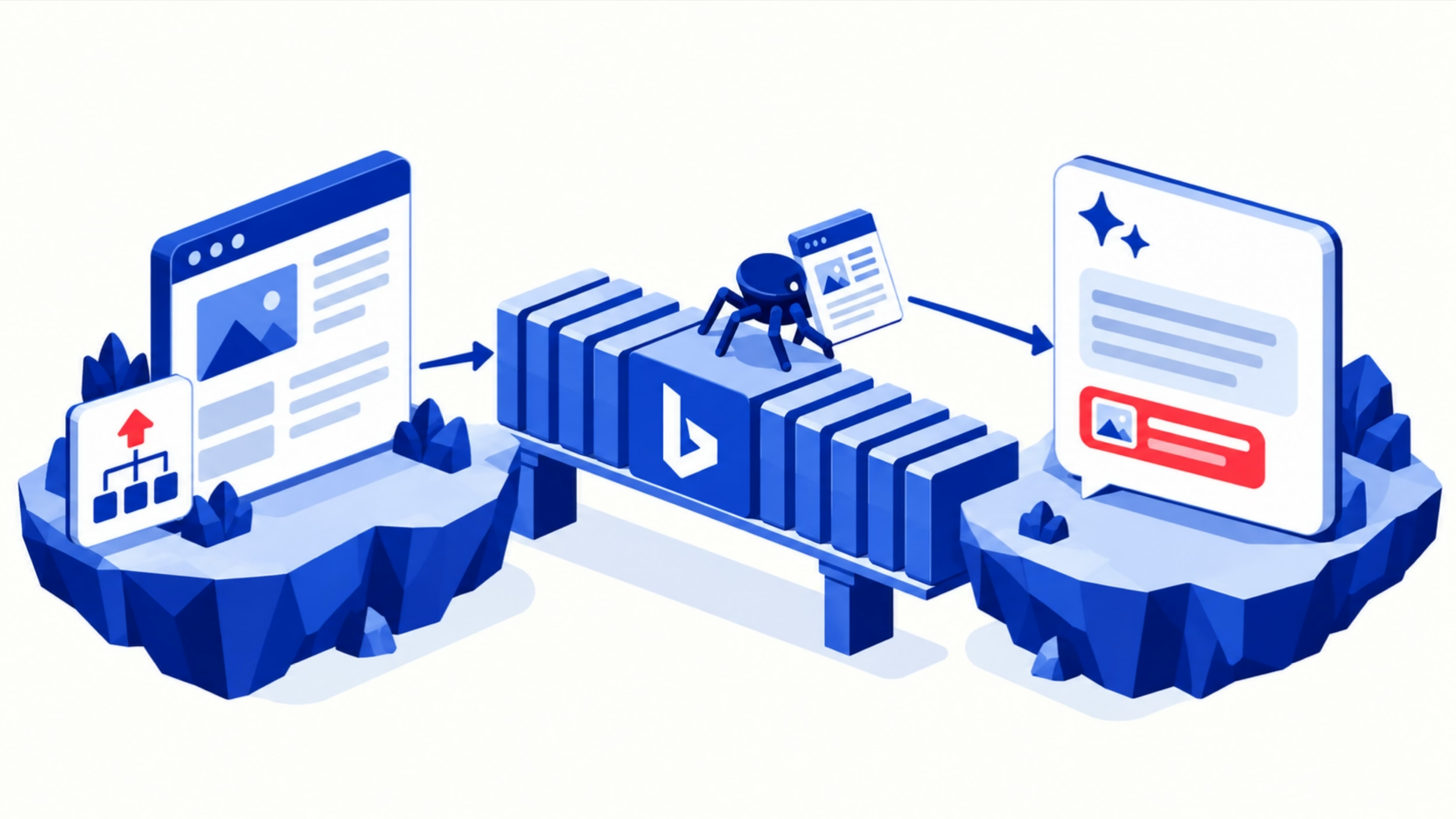
Key point. Microsoft Copilot answers web questions by sending a search to Bing and grounding its answer in what Bing returns. Microsoft documents this directly, and its webmaster guidelines say Copilot relies on the same crawling, indexing and ranking foundation as Bing search.
So the levers for Copilot are Bing's levers: let Bingbot crawl, get indexed through Bing Webmaster Tools, sitemaps and IndexNow, and use Bing's meta tags to set how much Copilot may use. NOARCHIVE keeps a page out of Copilot answers; NOCACHE limits Copilot to the URL, title and snippet. Bing's own crawler list names no separate Copilot crawler. To see what Copilot searched for, a user can open the Sources button under an answer; to see where your site is cited, use the AI Performance report in Bing Webmaster Tools.
This guide sits under the AI search visibility funnel. The same questions are answered for Google AI Overviews and AI Mode, Perplexity and ChatGPT search. Terms like grounding, index and citation are defined in our AI search glossary.
Which index does Copilot retrieve from?
Copilot retrieves from the Bing search index. Microsoft's documentation on Copilot's web search explains the mechanism: Copilot reads the user's prompt, picks out terms where web information would help, and "generates a search query that it sends to the Bing search service asking for more information." The same page states that "Microsoft Copilot and Microsoft Copilot Chat both use generated search queries sent to the Bing search service to ground responses in web data."
The Bing Webmaster Guidelines say the same from the publisher's side: "Bing and Copilot search experiences rely on the same core crawling, indexing, and ranking foundation as traditional search." The guidelines now describe how Bing "surfaces content across Bing search experiences, Copilot, and grounding API results."
Three details matter for marketers. First, the query Copilot sends is not the buyer's prompt; Microsoft says it "consists of a few words informed by the user's prompt." Second, the names have changed. The same Microsoft Learn page now opens: "Microsoft 365 Copilot is now named Microsoft Copilot, and Microsoft 365 Copilot Chat is now named Microsoft Copilot Chat." So when that page says "Microsoft Copilot", it means the work product that used to carry the Microsoft 365 name.
Third, Microsoft's consumer search product says the same about Bing. Its Copilot Search page states: "Copilot Search is grounded on Bing search results. It uses the Bing search results for the user query and additional search queries issued on the user's behalf to pull both information and sources used as part its response." One prompt can therefore produce several Bing searches. The same page separates "View sources", the sources the answer was pulled from, from "All links", which "weren't used to inform the Copilot Search responses". A link in the second list is not a citation. We have not read separate documentation for the copilot.microsoft.com app.
Which crawler fetches for it, and which is for training?
Bingbot fetches pages for Bing and therefore for Copilot; Bing's crawler list names no separate training crawler, and Microsoft ties training use to two meta tags instead. Bing's page Which crawlers does Bing use? says "Bingbot is our standard crawler and handles most of our crawling needs each day." The other Microsoft agents listed there are AdIdxBot for ads, and BingPreview, MicrosoftPreview and BingVideoPreview for page and video previews. None is described as a Copilot crawler.
For training, Microsoft's September 2023 announcement, written when Copilot was still called Bing Chat, set the rules:
- for content labelled
NOARCHIVE, "we will not use the content for training Microsoft's generative AI foundation models"; - for content labelled
NOCACHE, "only URLs, Titles and Snippets may be used in training Microsoft's generative AI foundation models"; - and "content with the NOCACHE tag or NOARCHIVE tag will still appear in our search results."
So unlike Google, where training has its own token, a Bing training choice and a Copilot visibility choice are made with the same tags.
The two vendors also read these tags differently, each by its own documentation. Google's robots meta tag specification says "The noarchive rule is no longer used by Google Search" and "The nocache rule isn't used by Google Search." Microsoft says NOARCHIVE keeps content out of Copilot. A noarchive left in a template from the days of cached pages does nothing in Google Search and removes those pages from Copilot answers.
What does Microsoft itself document?
Microsoft documents the Bing connection, the meta tags that govern Copilot, the discovery routes, and a citation report. The current Bing Webmaster Guidelines are the most direct source:
- "Use NOINDEX when a URL should NOT appear in Bing search, Copilot experiences, or grounding API results."
- "NOARCHIVE prevents content from being used in Copilot responses and grounding results."
NOCACHE"limits Copilot to using only the URL, title, and snippet".- "DATA-NOSNIPPET and NOSNIPPET prevent Bing from displaying captions and may limit Copilot citation quality."
- "robots.txt controls crawl access, not indexing."
- "Content that cannot be reliably rendered may not be indexed or selected for grounding results."
For discovery, the guidelines list IndexNow URL submission, XML sitemaps, crawlable internal links and external links from relevant websites. Microsoft's June 2025 Bing Webmaster Tools post adds that "Bing processes sitemaps at least once every 24 hours for indexing updates." The IndexNow documentation is honest about what a ping does: "The HTTP 200 response code only indicates that the search engine has received your URL." It speeds discovery. It does not guarantee indexing.
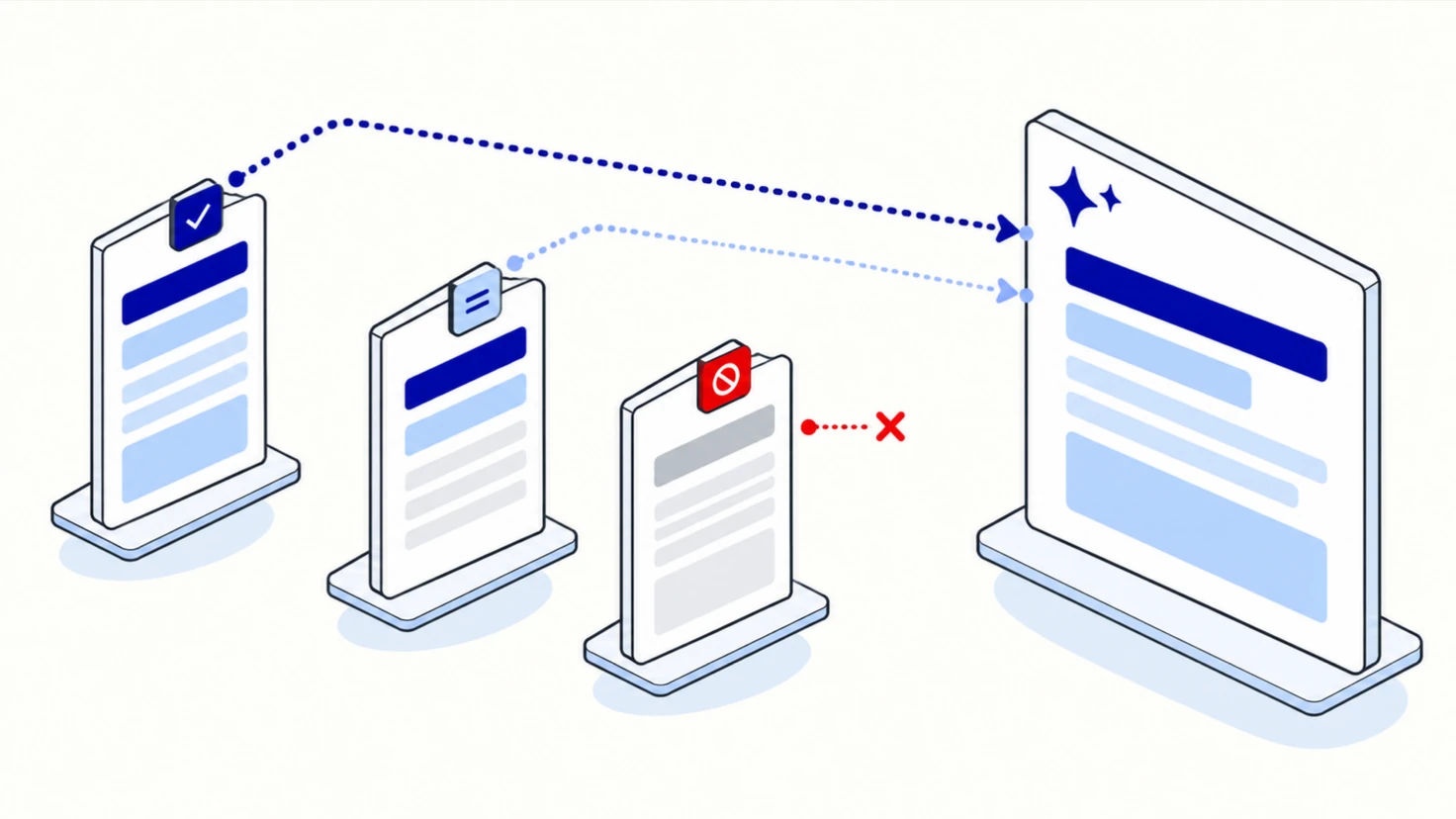
For measurement, Microsoft launched AI Performance in Bing Webmaster Tools as a public preview in February 2026. It "shows how publisher content appears across Microsoft Copilot, AI-generated summaries in Bing, and select partner integrations", with total citations, cited pages and "grounding queries", the phrases the AI used when retrieving your content. Microsoft notes that the grounding query data "represents a sample of overall citation activity."
What is Microsoft Web IQ, and what does it change?
Web IQ is Microsoft's grounding service for AI agents, announced on June 2, 2026 as "a search engine for AI systems". Microsoft says it starts from "the Bing global index and ecosystem" and was rebuilt for agents that search again and again inside one task.
Three points in the announcement matter for a site owner:
- It returns passages, not pages. "Web IQ does not just return documents; it returns passages and structured evidence objects." A paragraph that answers one question on its own is the unit that gets selected.
- It finds content with embeddings, then ranks it with dedicated models. An embedding model finds content that is close in meaning, and separate models rank and select it for use inside the AI's answer. Microsoft scores the result with "grounding satisfaction" (GDSAT): whether the evidence is complete, fresh and authoritative.
- It honors publisher controls. Microsoft says Web IQ inherits Bing's commitment to "robots exclusion protocols, publisher controls, and access preferences", so the Bing controls below apply to it.
The announcement does not say which Microsoft products, Copilot included, run on Web IQ. Read it as the direction of Microsoft's grounding stack rather than as a description of Copilot's exact pipeline.
What is reported but not confirmed?
Three claims about Copilot and Bing go further than Microsoft's documentation, and each needs care.
That Bing work also gets you into ChatGPT. Microsoft's June 2025 post says Bing powers AI tools "like ChatGPT and Inflection.ai". That is Microsoft's statement about a partner, not OpenAI's. OpenAI describes ChatGPT search as using third-party search providers and its own crawler, and does not say what share comes from Bing. Bing indexing is a reasonable second lever for ChatGPT; it is not a confirmed one. Our ChatGPT search guide covers the OpenAI side.
That Copilot cites whatever ranks top in Bing. Microsoft says Copilot shares Bing's crawling, indexing and ranking foundation. It does not document how Copilot chooses which of the returned pages to cite. We have not measured this for Copilot, so we make no claim either way. We have measured the equivalent question on Google, in our Google guide, and we do not move that finding to Copilot.
That the 2023 training rules still apply unchanged. The current guidelines restate the Copilot effect of NOARCHIVE and NOCACHE. The training effect comes from the 2023 announcement about Bing Chat. We found nothing that withdraws it, but if training use matters to you, ask Microsoft through Bing Webmaster Tools support rather than relying on a September 2023 post.
One related fact is documented and changes the market around Copilot: Microsoft retired the Bing Search APIs on August 11, 2025 and pointed customers to "Grounding with Bing Search" for AI agents. Third-party AI products that used to read raw Bing results had to move, which is one reason claims about "which tools use Bing" date quickly.
What we see in our own data
We read Microsoft's AI Performance report for our own site, elementera.com. The report lists citations of a site's pages and a sample of the searches Microsoft's AI ran before citing them. What it showed for us:
"Microsoft's AI Performance report counted 5,260 citations of our site in Microsoft's AI experiences between March 8 and September 6, 2026, rising from about 3 a day in March to about 63 a day in August. Its grounding-query report listed 73 searches Microsoft's AI ran when it cited us; ten were rewordings of one question."
What this does and does not show:
- It covers several Microsoft surfaces, not Copilot alone. Microsoft describes the report as covering "Microsoft Copilot, AI-generated summaries in Bing, and select partner integrations", and the export does not split them. So we say "Microsoft's AI experiences", never "Copilot cited us".
- The grounding queries are a sample. Microsoft says the query data "represents a sample of overall citation activity". Ten rewordings of one question is what query fan-out looks like from the publisher's side: the AI turned one question into several short searches, as Microsoft's documentation describes. The sample also shows what we are cited for, not only how often: "When Microsoft's AI cited our pages, 4 of the 73 searches it ran used the GEO paper's own method names, such as 'quotations statistics'." That describes the searches behind citations of our own site, not which term the market uses.
- It counts citations, not people or clicks. It does not say who asked, on which surface, or what the answer said.
- The rise is not evidence of a tactic. We published more pages over the same months, so the growth is not a no-change baseline and does not show that any one action worked.
- A daily count is noisy. "Day to day, the number of citations Microsoft's AI Performance report counted for our site moved by a median of about two-thirds (150 pairs of consecutive days), while the monthly total rose from 74 in March to 1,940 in August." Because our site was growing, that shows how much a single day's figure moves, not what a stable site would see. Compare months or weeks, never two days.
Copilot and ChatGPT both touch Bing, which makes it tempting to treat them as one engine. We do not. Their vendors describe different retrieval paths, and a result on one is not a result on the other. The report and a buyer's own questions answer different things: the report counts citations across Microsoft surfaces from a sample; asking Copilot a question shows what one buyer sees for one prompt. When we run repeated Copilot questions ourselves, we will ask each at least three times and report Copilot on its own. Read any single "Copilot visibility" number with the caution in why most AI visibility numbers mislead.
What can a site owner control, and what can they not?
You control whether Bing can crawl and index your pages and how much of each page Copilot may use; you do not control which pages Copilot cites, what query it sends to Bing, or whether a company lets its staff use web search at all.
What you control:
- Bingbot access. Robots.txt rules for Bingbot, and the Crawl control tool in Bing Webmaster Tools for crawl timing. Remember that robots.txt "controls crawl access, not indexing."
- Indexing.
NOINDEXkeeps a URL out of Bing search, Copilot and grounding results. - How much Copilot may use.
NOARCHIVEkeeps a page out of Copilot answers.NOCACHEallows only the URL, title and snippet.NOSNIPPETanddata-nosnippetstop captions and "may limit Copilot citation quality". You can address Bingbot alone with<meta name="bingbot" content="nocache">, the form Microsoft gives in its 2023 post. - Discovery speed. Sitemaps, IndexNow and URL submission in Bing Webmaster Tools. The IndexNow site lists Microsoft Bing, Naver, Seznam.cz, Yandex and Yep as supporting it; Google is not among them.
- Rendering. Content that needs client-side JavaScript to appear is a risk; Microsoft says content that cannot be reliably rendered may not be indexed or selected for grounding.
What you cannot control:
- which of the pages Bing returns Copilot cites;
- the short search query Copilot writes from the buyer's prompt;
- whether a buyer's employer has web search switched on. Microsoft says "Admin controls and a user-level Web content toggle are available". For a SaaS, fintech or other company selling to larger organizations, that means some enterprise buyers' Copilot answers may not use the web at all, and only what the model already knows about you applies.
How do I check whether it can see my site?
Check that Bingbot can crawl and index your pages, then use the AI Performance report and your own repeated questions.
- Verify your site in Bing Webmaster Tools. If you already use Google Search Console, Bing lets you import verified sites.
- URL Inspection. Check your home, pricing, product, comparison and integration pages for indexing status, response codes and blocked resources.
- Robots.txt tester. Confirm Bingbot can reach the pages that matter.
- Logs and the edge. Search logs for
bingbotand confirm the addresses with Microsoft's Verify Bingbot tool or its published address list. Bing warns that "user agent strings can be faked". Ask your CDN owner whether verified Bingbot traffic is ever challenged. - Meta tags. Search your templates for
noarchive,nocache,nosnippetandnoindex. Anoarchiveadded years ago to stop cached copies now keeps pages out of Copilot. - AI Performance. Read which pages are cited and the sampled grounding queries. This is the only Microsoft report that counts your citations.
- The Sources button. In Copilot Chat, Microsoft's support article says: "When Copilot uses web search, you'll see a Sources button below your response." Selecting it shows "the exact query Copilot sent to Bing and the sources it used." Microsoft Learn adds that these query citations are "available only in Microsoft Copilot Chat", not in the Copilot pane inside Word or PowerPoint, and stay in the chat thread "for 24 hours". In Copilot Search on Bing, read "View sources", not "All links".
- Repeated questions. Ask Copilot ten non-branded questions a buyer would ask before contacting a vendor, three times each on different days, and record the cited sources and the queries the Sources button shows.
- Referral traffic. Visitors who click a Copilot citation arrive as referral traffic; how to read and convert it is in converting visitors who arrive from AI answers.
The crawler checks for every engine are collected in being indexable by AI search engines.
What would change this advice?
This advice would change if Microsoft changed where Copilot gets web results or how its controls work:
- Copilot grounding in a source other than the Bing index, or a dedicated Copilot crawler.
- Microsoft separating the training control from
NOARCHIVEandNOCACHE, as Google did with its own token. - AI Performance leaving preview with clicks or full query data, which would replace part of the manual checking.
- A change in how much ChatGPT relies on Bing. That would not change the Copilot advice, but it would change how much one Bing effort is worth across engines.
- A repeated-question Copilot measurement of our own, which would add a Copilot-only result to the data section above.
Checklist for this week
Six steps, most of them for whoever owns your site templates:
- Verify your site in Bing Webmaster Tools, importing from Search Console if that is faster, and submit your sitemap.
- Turn on IndexNow, through your CMS or CDN if they support it.
- Search templates for
noarchiveandnocache, and remove any you did not choose for Copilot reasons. - Run URL Inspection on your five most important pages.
- Confirm with your CDN owner that verified Bingbot is never challenged.
- Record Copilot's cited sources and the Sources-button queries for ten buyer questions, three times each, and compare them with the grounding queries in the AI Performance report.
Frequently asked questions
Is there a Copilot crawler I need to allow?
No. Microsoft lists Bingbot as its standard crawler and describes no separate Copilot crawler. Allow Bingbot and you have done the crawler part.
Does noarchive hurt my Bing rankings?
Microsoft said in 2023 that content with NOCACHE or NOARCHIVE "will still appear in our search results." The current guidelines say NOARCHIVE keeps content out of Copilot responses, so it costs Copilot visibility, not search results.
How do I see if my content is cited in Copilot?
Two Microsoft tools answer two halves of the question. The AI Performance report in Bing Webmaster Tools counts citations of your pages across Microsoft's AI experiences, including Copilot, with a sample of the searches behind them. The Sources button under a Copilot Chat answer shows, for that one answer, the exact query sent to Bing and the sources used, for 24 hours.
How long does it take for new content to show up in Copilot answers?
It depends on when Bing indexes the page. Copilot grounds its web answers in the Bing index, so a new page has to be discovered and indexed by Bing first. A sitemap, URL submission in Bing Webmaster Tools or IndexNow speeds up discovery, but IndexNow's documentation says a 200 response "only indicates that the search engine has received your URL". Check the page in Bing before you expect a citation.
Does submitting to Bing Webmaster Tools guarantee I appear in Copilot?
No. Submission and IndexNow speed up discovery; IndexNow's own documentation says a 200 response "only indicates that the search engine has received your URL." Indexing and citation remain Microsoft's decisions.
Does Bing work also help with ChatGPT and Perplexity?
For ChatGPT, possibly: Microsoft says Bing powers AI tools like ChatGPT, and OpenAI names no share. For Perplexity, neither company documents a Bing link. See our Perplexity guide.
Work with us
There are two ways to work with us. Teams that want the measurement and the work done for them can use our managed AEO services: Book a call. Teams that want to see where they stand first can start with Lenz, our free analysis of how ChatGPT and Gemini answer their buyers' questions: Get your free AI visibility report.
How this page was made
Written by Mojtaba Ebadi. Reviewed by Dr. Mehrdad Mehrbod.
Sources
- Microsoft Learn, Data, privacy, and security for web search in Microsoft Copilot and Microsoft Copilot Chat, last updated 2026-08-18, fetched 2026-10-06.
- Microsoft Support, How web search works in Microsoft Copilot Chat and agents, updated 2026-09-29, fetched 2026-10-06.
- Microsoft, Copilot Search in Bing, fetched 2026-10-06.
- Google Search Central, Robots meta tag, data-nosnippet, and X-Robots-Tag specifications, last updated 2026-03-24.
- Bing, Bing Webmaster Guidelines, read 2026-10-05 (the page loads its text with JavaScript).
- Bing, Which crawlers does Bing use?, read 2026-10-05 (the page loads its text with JavaScript).
- Bing Webmaster Blog, Announcing new options for webmasters to control usage of their content in Bing Chat, September 22, 2023.
- Bing Webmaster Blog, Start Using Bing Webmaster Tools to Improve Your Site Visibility, June 17, 2025.
- Bing Webmaster Blog, Introducing AI Performance in Bing Webmaster Tools Public Preview, February 10, 2026.
- Microsoft Learn, Bing Search APIs retiring on August 11, 2025.
- Microsoft Bing Blog, Announcing Microsoft Web IQ, June 2, 2026, fetched 2026-10-15.
- IndexNow, Documentation and home page, accessed 2026-10-05.
- Bing, Verify Bingbot and Bingbot address list.
- Elementera, Bing Webmaster Tools AI Performance export for elementera.com, March 8 to September 6, 2026 (daily citations and the grounding-query report). Method: how we measure AI visibility.

Sr. Engineering Leader with 15+ years of experience. Ex-ApplyBoard. AWS Certified Solutions Architect.

Known professionally as Dr. Med with 12+ years of experience implementing AI products. Strategic advisor to multiple successful founders including a unicorn, US patent holder. Ex-SOTI, UC Berkeley PhD.
Related articles
- How ChatGPT search finds and cites sources, and what a site owner controls
- How Google AI Overviews and AI Mode choose sources, and what a site owner controls
- Can AI search engines fetch and index your pages? What you control
- How to advertise in AI assistants: what is live now
- How to choose an AEO agency: the questions to ask, the red flags, and what a managed AEO service should deliver
Latest articles
- AI search glossary: 55 terms, defined precisely
- Elementera receives angel investment to grow Lenz and the team behind it
- Is good AEO just good SEO? What our measurements show
- Dental Practice Software in 2026: A Practical Guide to PMS Platforms and AI Tools (US and Canada)
- Google Preferred Sources and AEO: what it is and how it affects your AI visibility